
Prepare lists
Work from chat contacts and lead lists without losing the context of the chat workspace.
WA Web bulk sender
WA Web Utils helps teams prepare broadcasts with templates, audience review, pacing awareness, CRM context, and clearer operator handoff for responsible messaging.
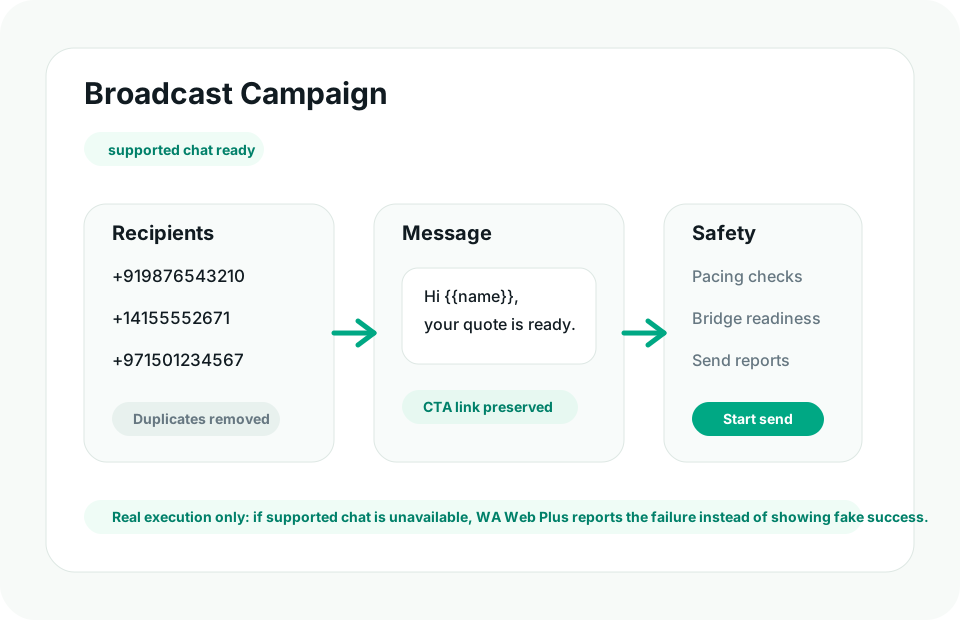
Workflow
Use WA Web Utils for legitimate customer communication where pacing and visibility matter.
Work from chat contacts and lead lists without losing the context of the chat workspace.
Keep campaign wording consistent across common sales, support, and renewal messages.
Confirm the WA Web workspace is connected and able to send before live campaign work starts.
Keep sending rhythm visible so operators understand what is happening.
Make skipped, failed, and completed states clearer during campaign preparation.
Use bulk tools for customers who expect to hear from you and follow local rules.
Remove duplicates and send only to relevant recipients.
Use approved copy before the campaign is started.
Confirm the WA Web workspace is open, connected, and ready.
Guide
WA Web Utils gives careful operators structure around broadcasts. It is not a shortcut around consent, platform policies, or local messaging rules.
FAQ
WA Web Utils supports structured bulk-message and broadcast workflows with templates, audience review, and readiness checks for responsible operators.
No. Users remain responsible for consent, pacing, message relevance, and compliance with platform rules and applicable law.
Ready
Install WA Web Utils and choose the plan that matches your broadcast workflow.